
Forgive me for the gloating, but I really didn’t find any tutorials on this. I think I can say I came up with this original solution entirely on my own 🙂 and this is what it looks like:
- Blending Problems during Rendering
First I need to need explain the rendering process of the smoke in my program. I used the Two Pass Ray Casting technique, and the following diagram briefly illustrates the method:
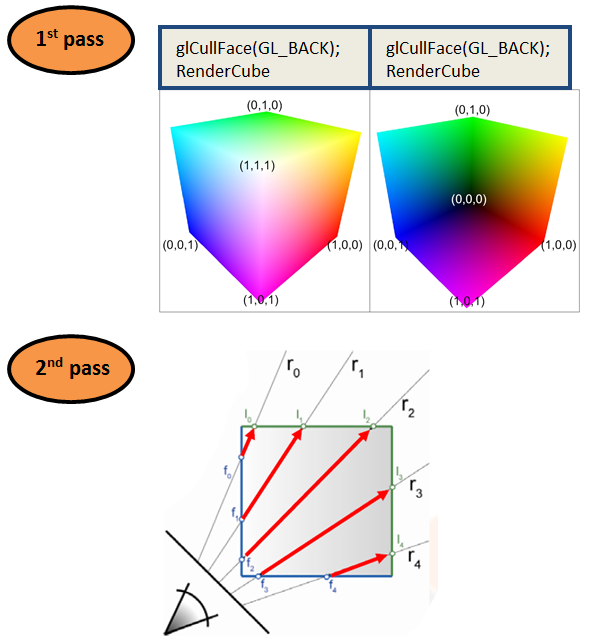
In the second pass, we render a full screen quad and we draw all our smoke on it. Here’s the code for the geometry shader
#version 330

layout(points) in;
layout(triangle_strip, max_vertices = 4) out;

in vec4 vPosition[1];	// this is just the origin, vec4(0,0,0,0)
out vec2 gTexCoord;

void main()
{
    float m = 1;
    gTexCoord = vec2(1, 0); gl_Position = vec4(+m, -m, 0, 1); EmitVertex();
    gTexCoord = vec2(1, 1); gl_Position = vec4(+m, +m, 0, 1); EmitVertex();
    gTexCoord = vec2(0, 0); gl_Position = vec4(-m, -m, 0, 1); EmitVertex();
    gTexCoord = vec2(0, 1); gl_Position = vec4(-m, +m, 0, 1); EmitVertex();
    EndPrimitive();
}
Then in the fragment shader we do our raytracing
#version 330

out vec4 FragColor;
in vec2 gTexCoord;

uniform sampler2D RayStartPoints;
uniform sampler2D RayStopPoints;
uniform sampler3D Density;

uniform vec3 LightIntensity = vec3(10.0);
uniform float Absorption = 1.0;

const float maxDist = sqrt(2.0);
const int numSamples = 128;
const float stepSize = maxDist/float(numSamples);
const float densityFactor = 10;

void main()
{
    // range [-1:1, -1:1, -1:1]
    vec3 rayStart = texture(RayStartPoints, gTexCoord).xyz;
    vec3 rayStop = texture(RayStopPoints, gTexCoord).xyz;
    float Regular_Depth = texture(DepthMap, gTexCoord.xy).r;

    // if it's pixel is at a point outside the cube, we set the alpha to 0, which is fully transparent
    // so we can see other stuff. Be sure to have GL(GL_BLEND) on
    if (rayStart == rayStop)
    {
        FragColor = vec4(0.2,0.2,0.2,0);
        return;
    }

    // converting from NDC[-1,1] to texture coordinates[0,1]
    rayStart = 0.5 * (rayStart + 1.0);
    rayStop = 0.5 * (rayStop + 1.0);

    vec3 pos = rayStart;
    vec3 step = normalize(rayStop-rayStart) * stepSize;
    float travel = distance(rayStop, rayStart); // the depth each pixel will traverse
    float T = 1.0;          // transparency
    vec3 Lo = vec3(0.0);    // iniital color
    vec3 d_pos;

    for (int i=0; i < numSamples && travel > 0.0; ++i, pos += step, travel -= stepSize)
    {
        // grab the 3D texture density
        float density = texture(Density, pos).x * densityFactor;

        if (density <= 0.0)
            continue;

        // the absorption function is the probability that a photon traveling over a unit distance is lost by absorption
        T *= 1.0-density*stepSize*Absorption;

        // if the composite transparency falls below a threshold, we quit
        // since the color is no longer transparent, so it won't change much
        if (T <= 0.01)
            break;

        float Tl = 1.0;
        vec3 Li = LightIntensity*Tl;
        Lo += Li*T*density*stepSize;
    }

    FragColor.rgb = Lo;
    FragColor.a = 1-T;
}
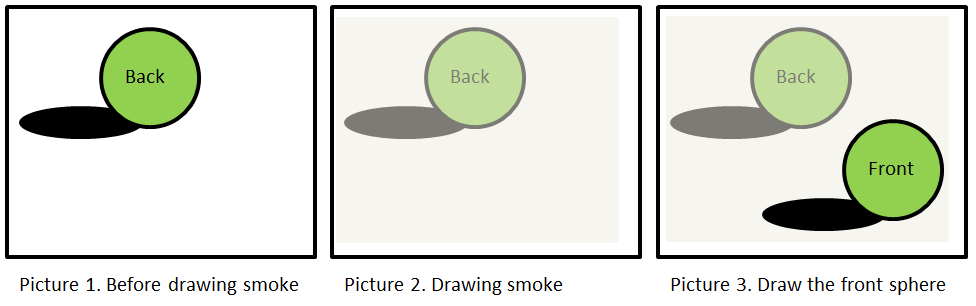
The problem with this code is that when your world has other object, the smoke will block everything else, like the picture below:

Clearly the sphere at the bottom should be in front of the smoke, so we should actually see the ball blocking the smoke, not the other way around. The reason why this is happening is that in my Render function, I am drawing the spheres + shadows first, and then leaving the smoke to the last.

Because of how blending works, the smoke is being blended with the source pixels (Picture 1), which already has correct colors drawn. Of course the brute force solution is draw everything in back to front order. But that implies that we do the position sorting in the CPU. However smoke’s irregular shape makes comparing unfeasible and it still doesn’t solve the problem of rendering spheres surrounded by smoke.
- Concept and Solution
The solution I came up with is to do a depth comparison in the fragment shader. Imagine the following picture. Before we render the smoke, we obtain a depth texture of all the scene. Then during the ray tracing, we manually calculate the depth of the specific ray tracing point. Eventually we compare the depth of that specific pixel and determine whether we draw the smoke or the sphere.
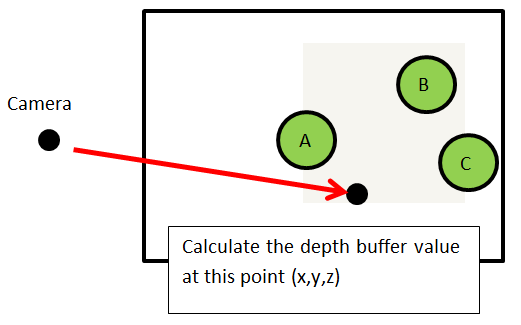
In this case, the depth value of any pixels on sphere A will be less than calculated smoke depth, so we will skip these pixels when we visit them in the ray tracing fragment shader. We calculate the ray tracing color until we run into sphere B and C.
- Implementation
The fragment shader code is shown below.
#version 330

out vec4 FragColor;
in vec2 gTexCoord;

uniform sampler2D RayStartPoints;
uniform sampler2D RayStopPoints;
uniform sampler3D Density;
uniform sampler2D DepthMap;

uniform mat4 m_ModelviewProjection;

uniform vec3 LightIntensity = vec3(10.0);
uniform float Absorption = 1.0;

const float maxDist = sqrt(2.0);
const int numSamples = 128;
const float stepSize = maxDist/float(numSamples);
const float densityFactor = 10;

int TestFlag = 1;

float CalcDepthValue(vec3 Depth_Vertex)
{
    vec4 Clip_DepthPosition = m_ModelviewProjection * vec4(Depth_Vertex,1.0);
    float depthValue = Clip_DepthPosition.z / Clip_DepthPosition.w; // Depth in NDC coordinates
    return (depthValue + 1.0) * 0.5;    // Depth value in range [0,1], same range as the depth buffer
}

void main()
{
    // range [-1:1, -1:1, -1:1]
    vec3 rayStart = texture(RayStartPoints, gTexCoord).xyz;
    vec3 rayStop = texture(RayStopPoints, gTexCoord).xyz;
    float Regular_Depth = texture(DepthMap, gTexCoord.xy).r;

    if (rayStart == rayStop)
    {
        FragColor = vec4(0.2,0.2,0.2,0);
        return;
    }

    // converting from NDC[-1,1] to texture coordinates[0,1]
    rayStart = 0.5 * (rayStart + 1.0);
    rayStop = 0.5 * (rayStop + 1.0);

    vec3 pos = rayStart;
    vec3 step = normalize(rayStop-rayStart) * stepSize;
    float travel = distance(rayStop, rayStart); // the depth each pixel will traverse
    float T = 1.0;          // transparency
    vec3 Lo = vec3(0.0);    // iniital color
    vec3 d_pos;             // Depth position

    for (int i=0; i < numSamples && travel > 0.0; ++i, pos += step, travel -= stepSize)
    {
        // grab the 3D texture density
        float density = texture(Density, pos).x * densityFactor;

        // change texture coord back to NDC coord
        d_pos = 2*pos - 1.0;

        // we do our depth test
        if (TestFlag == 1)
        {
            // compare depth value of smoke with object depth
            if ( density > 0.000 && (Regular_Depth < CalcDepthValue(d_pos)))
            {
                FragColor = vec4(0.2,0.2,0.2,0);
                return;
            }
            // if there are smoke in front of the Objects, we no longer do any depthTest
            else if (density > 0.000 && (Regular_Depth >= CalcDepthValue(d_pos)))
                TestFlag = 0;
        }
        else
        {
            // we check if we ever run into a sphere in the smoke
            if( Regular_Depth < CalcDepthValue(d_pos))
            {
                // calculate the color and exit
                T *= 1.0-density*stepSize*Absorption;
                if (T <= 0.01)
                    break;
                float Tl = 1.0;
                vec3 Li = LightIntensity*Tl;
                Lo += Li*T*density*stepSize;
                FragColor.rgb = Lo;
                FragColor.a = 1-T;
                return;
            }
        }

        if (density <= 0.0)
            continue;

        // the absorption function is the probability that a photon traveling over a unit distance is lost by absorption
        T *= 1.0-density*stepSize*Absorption;

        // if the composite transparency falls below a threshold, we quit
        // since the color is no longer transparent, so it won't change much
        if (T <= 0.01)
            break;

        float Tl = 1.0;
        vec3 Li = LightIntensity*Tl;
        Lo += Li*T*density*stepSize;
    }

    FragColor.rgb = Lo;
    FragColor.a = 1-T;
}
Our first goal is to get the raytracing points in object space. If you refer back to the pictures in the raytracing part, the variable pos will have values between [0,1] since we converted raystart and raystop to texture coordinates. For this reason, we need to get d_pos to convert pos back to the [-1,1] range, so that the vertex values will be in proper object space.
I defined a function CalcDepthValue to calculate the depth buffer value. The actual calculation is pretty straightforward, but it took a lot of googling XD. We take our vertex that is already in object space and multiply it with the ModelViewProjection Matrix. We then do a perspective division and convert the range from [-1,1] to [0,1] so that it is in proper depth buffer range (which by default is between 0,1, but you can change in using glDepthRange).
When I was debugging, I especially added these few lines in the for loop to help myself. In this way I can visually see the grids that has smoke, as well as the depth values.
    for (int i=0; i < numSamples && travel > 0.0; ++i, pos += step, travel -= stepSize)
    {
        // grab the 3D texture density
        float density = texture(Density, pos).x * densityFactor;

        // change texture coord back to NDC coord
        d_pos = 2*pos - 1.0;

        ...
        ...

        if(density > 0.000)
        {
            FragColor = vec4(0,pow(CalcDepthValue(d_pos),16),0,1);
            return;
        }

        ...
        ...
    }
First the (density > 0.000) will highlight all the grids that has smoke, then we display the depth value in those grids. To make the difference in depths more visual, I used pow() trick. In this way you can clearly see darker and lighter parts, indicating the differences in depth.

- Further Studies
At first, I did looked into NVIDIA’s GPU Gems 3’s article Real-Time Simluation and Rendering of 3D Fluids for solving dynamic obstacles, but their method requires the usage of stencil buffer and rendering all objects into the smoke’s 3D texture’s slabs. However, I was looking for a simpler solution where the smoke and objects have no complicated interactions. This is what I came up with. Nevertheless I will defintely try out their method some day.
 PHrameBuffer